





Instagram has evolved far beyond a photo-sharing app. It’s now one of the most powerful tools for creators and encourages storytelling and building genuine connections.
Good Instagram post design gives the reader a clear starting point, readable text, and a reason to continue. The styles below are options to adapt to your brand, not predictions about what the algorithm will reward.
For me, design isn’t just about looking good. It’s about communicating clearly and showing up with intention. Whether you’re a coach, creative entrepreneur, or small business owner, your post design plays a major role in how your audience perceives your brand.
If you want your visuals to feel cohesive, elevated, and consistent, my Canva Templates are built to help you create high-end Instagram content without the design overwhelm. (And if you’re ready to upgrade your imagery, my AI Stock Image Collections pair beautifully with your existing brand photos for a seamless, editorial-quality look.)
Ask yourself: Does your Instagram feed actually reflect the level of professionalism and value your business offers? If not, this is the year to change that.
Why Instagram Trends Matter for Your Brand
Trends aren’t about chasing likes or copying what’s popular. They’re about understanding how people consume content today, and how your brand can stay relevant without losing authenticity.
By keeping up with design trends, you can:
- Stay visually aligned with modern aesthetics
- Communicate in a way that resonates now
- Keep your content fresh and engaging
- Post with intention instead of out of habit
Before you post, think: Is my content helping me connect, educate, or inspire? Trends are only valuable when they support your goals, not distract from them.
How Instagram Fits Into a Larger Brand Strategy
Instagram isn’t just about aesthetics or likes. It’s a tool for storytelling, connection, and conversion.
Your design helps people:
- Notice you in their feed
- Understand your message quickly
- Feel connected to your brand story
- Take action, whether that’s following, engaging, or purchasing
Ask yourself: What do I want people to feel when they see my posts? Once you know that, design becomes the bridge between your message and your audience’s emotions.
Instagram Design Approaches to Try
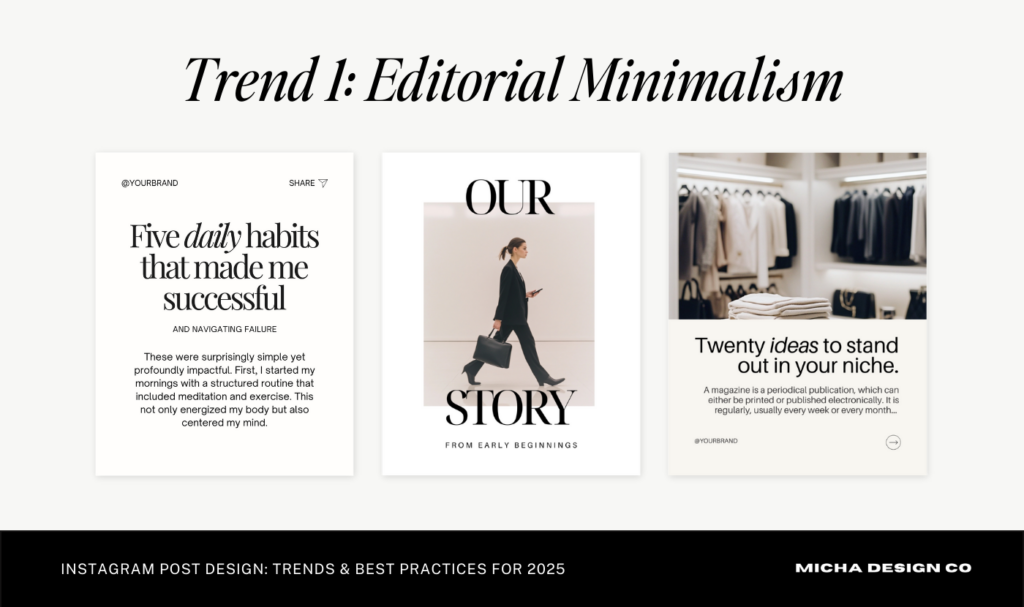
Editorial Minimalism: Modern, Clean, and Strategic
Structured layouts, strong typography, and deliberate spacing are editorial approaches I like for clear educational posts. Brooklyn and Milan offer examples of how a layout can balance a headline, supporting text, and an image.
Collage & Mixed Media Aesthetics
Combining polaroid frames, cut-outs/torn paper, and scribbled elements, this trend adds movement and depth to your posts. It’s playful, expressive, and ideal for brands with a more creative or personal tone. You can find layouts that play into this feel within my Vienna Canva template bundles, which pair beautifully with textured, collage-style posts.
Muted Luxe Color Palettes
Muted beige, blush, and warm neutrals are options when they fit your brand. Choose your palette for contrast and relevance to your own visual direction, rather than treating a color as a requirement.
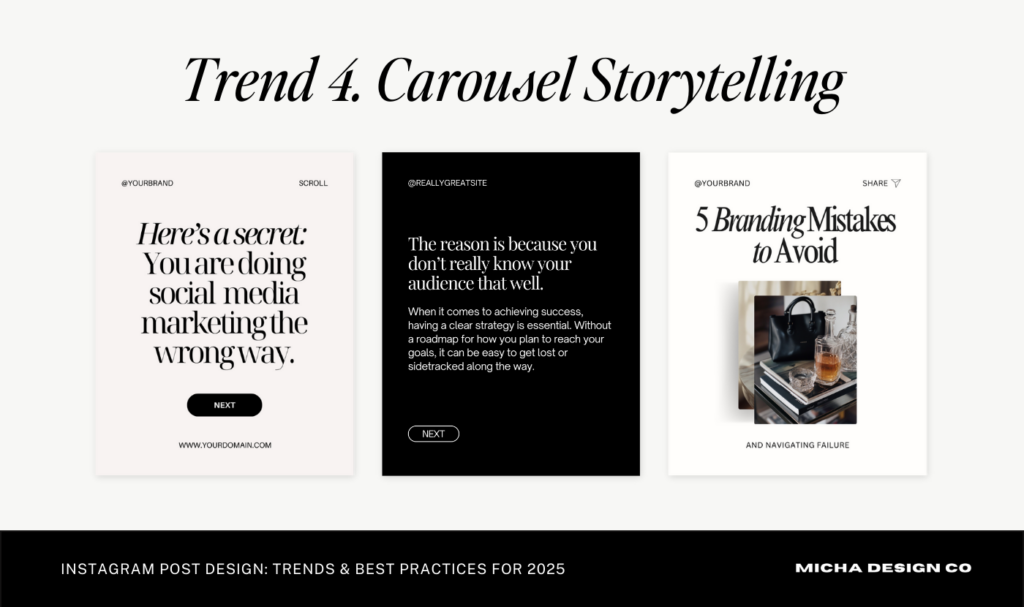
Carousel Storytelling
A carousel gives you room to develop an idea across several slides. Give each slide a distinct job and a reason to continue; do not stretch a short point into extra pages merely to make a longer carousel.
Text-Focused Slides That Breathe
You can say more on Instagram with design that supports text-richness. This trend uses smart spacing, bold headers, and minimal fonts to make long-form text easy to read and skimmable. If you’re an educator, coach, or content creator, these templates will help you share deeper messages with your audience in a clear way.
Raw, Relatable Content With Visuals
Perfection is out. People crave authenticity. Pair natural, real-life images with your polished graphics to show the human side of your brand. My Auréa Stock Photo Collection is designed to blend effortlessly with real content, giving you that authentic yet cohesive aesthetic.
Micro Calls-to-Action
Not every post needs a big “Buy Now” button. Sometimes, a small nudge like “save this,” “share with a friend,” or “comment below” is enough to boost engagement and build trust. My Canva templates include pre-designed CTAs to make engagement feel natural and inviting.
Enhanced Visuals for an Aesthetic Edge
AI imagery can support conceptual or atmospheric visuals. Compare the current collections in the shop, inspect the images carefully, and retain real photography wherever the viewer needs to see your actual work or people.
The Role of Stock Photos in a Consistent Instagram Feed
You don’t need to take new photos every week to maintain a strong feed. High-quality stock photos help you stay visually consistent while saving time and energy.
Use them to:
- Keep your visuals professional and cohesive
- Reinforce your brand story
- Fill visual gaps when you don’t have new content
- Maintain an intentional, elevated aesthetic
Ask yourself: Do the images I post actually reflect the brand I’m trying to build? Explore my AI Stock Image Collections for refined, cohesive imagery that fits your brand effortlessly.
Practical Checks Before You Post
Design alone isn’t enough. Connection is what keeps your audience engaged and coming back.
Use genuine examples and clear explanations. A natural image can work alongside a designed graphic, but an intentionally polished brand does not need to pretend to be unpolished.
Keep these best practices in mind to generate high engagement and conversion:
- Use Canva templates to speed up creation and stay consistent
- Pair personal images with professional stock photos
- Follow trends that align with your brand personality
- Make sure your text is readable and your copy connects
- Post intentionally, not just because you “should”
- Prioritize connection over perfection
How my editorial background changes the design decision
My interest in design began with mock magazine layouts: photographs, typography, and space working together on a page. I bring that same concern to a carousel. The cover needs to establish the idea, the interior slides need a readable rhythm, and the final slide needs to make the next step clear. An editorial style has to serve that reading experience.
Try designing the same tip in two ways: one oversized headline with a small supporting image, and one photo-led cover with a short headline in a quieter area. Preview both on your phone. Check the contrast, the crop, and whether the title makes sense without the caption. Choose the version that communicates more clearly for that post. Your preferred style can vary; repeating a few type styles and spacing choices is what helps the pages belong together.
Final Thoughts
A consistent visual direction is useful when it helps people recognize your content and understand the message. Choose a style you can keep using and review its performance against the job of each post.
If you’re ready to make your feed feel cohesive and elevated, explore my Canva Template Shop and AI Stock Image Collections.
They’ll help you post with purpose, save time, and finally feel proud of how your brand shows up online.
For a related next step, see How to Make Instagram Posting Easier: Inside the Brooklyn Canva Template, 9 Instagram Post Ideas Entrepreneurs Need on Their Feed, How to Use Stock Images Thoughtfully on Your Website.
Want to test the workflow on one post? Download the free Brooklyn Canva template sample, replace the sample words with one useful idea, and check the result on your phone.





If you want to elevate your graphic design game, enjoy talking about small business entrepreneurship, and appreciate a spark of inspiration mixed with authenticity...You've come to the right place.
Follow
Let's be social →
Join
Join the newsletter →